
How Philippine SMEs Can Start With AI Without a Data Team
A step-by-step way for Philippine SMEs to start using AI with the team they already have: pick one task, write a fact sheet, test, then automate.
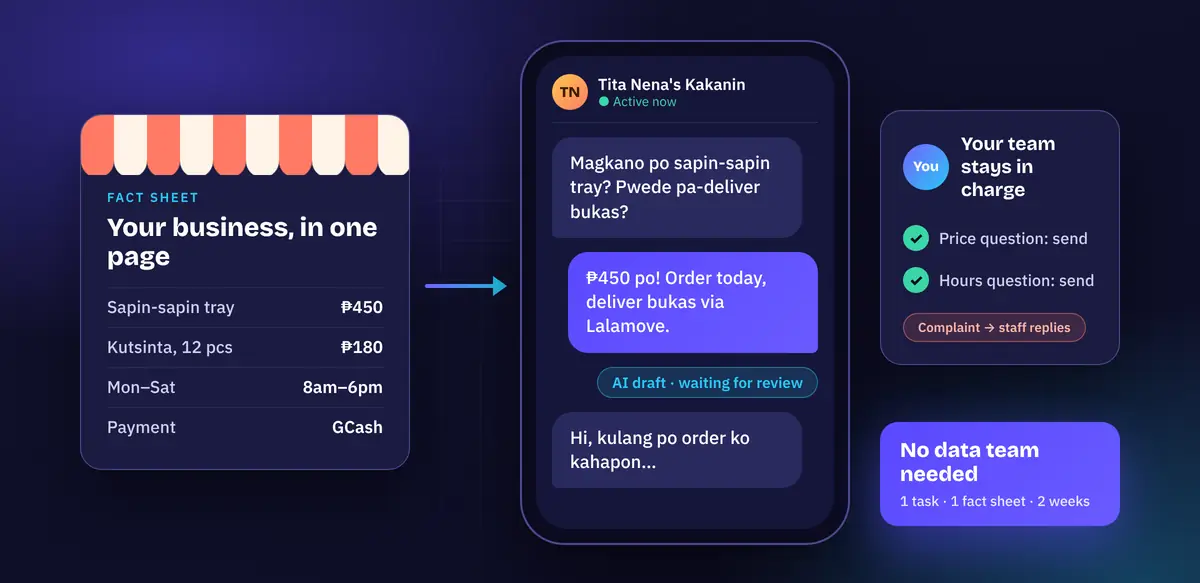
Short answer: you don’t need a data team to start using AI. You need one repetitive, text-heavy task (answering the same customer questions, encoding orders, summarising reports), one person who already does that task, a one-page fact sheet about your business, and two weeks of testing with a human approving every output. Start with a ready-made AI chat tool, move to a small script only when copy-paste becomes the bottleneck, and keep a person in the loop for anything involving money or complaints.
Most small businesses we talk to in the Philippines assume AI starts with “big data”, a data scientist and a dashboard. For the first project it almost never does. Modern language models already understand English, Filipino and Taglish reasonably well; what they don’t know is your prices, your rules and your tone. Giving them that is a writing job, not a data-science job. Here is the path we recommend, in order.
Step 1: Pick one task, not “AI for the business”
Walk through a normal week with your team and list the jobs that are repetitive, mostly text, and checkable by someone who already does them. Good first candidates for a Philippine SME:
- Customer inquiries on Facebook Messenger, Viber or email: “magkano po?”, “available pa?”, “open kayo Sunday?”
- Order encoding: copying orders from chat messages into a spreadsheet or POS.
- Receipts and supplier invoices: pulling date, supplier, amount and TIN into a sheet for your bookkeeper.
- First drafts of product descriptions, job posts or internal memos.
Pick the one where a mistake is cheap and easy to spot. Customer inquiries are usually the best start: the volume is high, the questions repeat, and a staff member can read every draft before it is sent. Leave anything that decides money, credit or hiring for later.
Write one sentence describing success, for example: “Our page admin can answer routine price and schedule questions in half the time, with no wrong prices sent.” If you can’t write that sentence, the task isn’t specific enough yet. Our guide on how to scope a two-week AI pilot goes deeper on this step.
Step 2: Write a one-page fact sheet
This is the step that replaces the “data team”. The model will invent prices and promises if you don’t give it the real ones, so write them down in plain text: products and prices, hours, branches, delivery options, payment methods, lead times, and the policies your staff repeat every day. Keep it short and current. Here is the shape (example business, made-up details):
Business: Tita Nena's Kakanin, Quezon City (example)
Products: bibingka P120/pc, sapin-sapin tray P450, kutsinta 12pcs P180
Hours: Mon-Sat 8am-6pm. Closed Sundays.
Delivery: Lalamove or Grab, customer pays delivery fee.
Orders for trays need 1 day notice.
Payment: GCash or cash on pickup.
Name one owner for this file. When a price changes, the fact sheet changes the same day. Most “the AI said something wrong” problems we see turn out to be an outdated fact sheet, not a bad model.
Step 3: Test it by hand with an off-the-shelf AI tool
Before writing any code, open a business plan of an AI chat tool (Claude, ChatGPT or Gemini all work for this; use a team or business plan rather than a personal free account, and check its data-use settings). Paste in the fact sheet and an instruction like:
You reply to customer messages for our business. Use ONLY the facts above.
Reply in the customer's language (English, Filipino or Taglish), short and polite, with "po" where natural.
If the facts don't answer the question, say a team member will reply shortly.
If the customer is complaining or asking for a refund, don't promise anything; say a team member will follow up.
Then paste in 30 to 50 real past messages, one at a time, and have the person who normally answers them mark each draft as “send as-is”, “small edit” or “wrong”. Remove names and phone numbers before pasting. Two things will happen: you’ll find gaps in your fact sheet (fix them), and you’ll get an honest sense of whether this saves time. If most drafts are “wrong” after fixing the fact sheet, stop here; you’ve learned something for the cost of an afternoon.
Keep those messages and their verdicts. They become your test set, and our tutorial on writing an evaluation set in one afternoon shows how to turn them into automatic checks.
Step 4: Automate the copy-paste with a small script
Once the manual test works, the bottleneck becomes copying messages in and out. A short script can take an export of messages (a CSV with id and message columns), sort each one, draft a reply, and flag the ones a person must handle. Your staff still review and send every reply. This uses the Anthropic Python SDK (pip install anthropic, with your key in the ANTHROPIC_API_KEY environment variable) and a small, inexpensive model, because sorting and short replies don’t need the biggest one:
import csv, json, sys
import anthropic

CATEGORIES = ["price_or_availability", "order_status", "booking", "complaint", "other"]

SYSTEM = f"""You help a small Philippine business sort customer messages.
Messages may be in English, Filipino or Taglish. For each message, return ONLY a JSON object:
{{"category": one of {CATEGORIES},
  "language": "en" | "fil" | "taglish",
  "needs_human": true if it is a complaint, mentions money owed or a refund, or you are unsure,
  "draft_reply": a short, polite reply in the customer's language, using ONLY the facts below.
                 If the facts don't cover it, say a team member will reply shortly.}}

Business facts:
{{facts}}"""

def triage(client, facts, message, model="claude-haiku-5-5"):
    resp = client.messages.create(
        model=model,
        max_tokens=400,
        system=SYSTEM.replace("{facts}", facts),
        messages=[{"role": "user", "content": message}],
    )
    text = resp.content[0].text.strip()
    try:
        data = json.loads(text[text.find("{"): text.rfind("}") + 1])
    except ValueError:
        return {"category": "other", "language": "", "needs_human": True,
                "draft_reply": "", "error": "unparseable"}
    if data.get("category") not in CATEGORIES:
        data["category"], data["needs_human"] = "other", True
    return data

def main(inbox_csv, facts_txt, out_csv, client=None):
    client = client or anthropic.Anthropic()  # reads ANTHROPIC_API_KEY
    facts = open(facts_txt, encoding="utf-8").read()
    with open(inbox_csv, newline="", encoding="utf-8") as f:
        rows = list(csv.DictReader(f))          # columns: id, message
    fields = ["id", "message", "category", "language", "needs_human", "draft_reply"]
    with open(out_csv, "w", newline="", encoding="utf-8") as f:
        w = csv.DictWriter(f, fieldnames=fields, extrasaction="ignore")
        w.writeheader()
        for row in rows:
            w.writerow({**row, **triage(client, facts, row["message"])})
    print(f"Triaged {len(rows)} messages -> {out_csv}")

if __name__ == "__main__":
    main(*sys.argv[1:4])
Run it with python triage_inquiries.py inbox.csv facts.txt triaged.csv. Given messages like these:
id,message
1,"Magkano po sapin-sapin tray? Pwede pa-deliver bukas sa Marikina?"
2,"Hi, my order yesterday was missing 2 bibingka. Pls refund."
3,"Open po kayo Sunday?"
you get back a spreadsheet with a category, language, a needs_human flag and a draft reply on each row. Your admin sorts by needs_human, handles the flagged ones personally, skims and sends the rest. A few design choices are worth copying even if you build it differently:
- Fail safe. If the model returns something unreadable or an unknown category, the row is marked
needs_humaninstead of guessing. - Complaints and refunds always go to a person. The model drafts, but it never decides.
- Facts live in a text file, not in the code, so the person who owns prices can update them without a developer.
We tested this script with a stubbed API client covering a normal Taglish question, an unreadable model response and an invalid category. Test it the same way against your own saved messages before trusting it.
Step 5: Handle personal data properly from day one
Customer messages contain names, numbers and addresses, so the Data Privacy Act of 2012 (Republic Act No. 10173) applies, and the National Privacy Commission (NPC) is the regulator. You don’t need a lawyer to start a small pilot, but you do need a few habits:
- Only send the AI tool what the task needs. Strip phone numbers and addresses from test data.
- Use a business plan or the API, and confirm in the provider’s terms whether your data is used for training and how long it is kept.
- Tell customers in your privacy notice that you use service providers, including AI tools, to help respond to messages.
- Keep a short written note of what data goes where, and who can see the output files.
This isn’t legal advice; if you process sensitive personal information (health, government IDs, financial accounts), talk to a privacy professional before you automate anything.
Step 6: Decide after two weeks with numbers, not feelings
At the end of the pilot, look at three things you can count yourself: how many drafts were sent as-is or with small edits, how many were wrong, and roughly how much time your admin spent per message before and after. If the drafts are mostly usable and nothing harmful slipped through, keep it and pick the next task. If not, the fact sheet, the instruction and your test set are still useful, and you’ve spent very little to find out.
Notice who did the work here: the person who already answers customers, plus whoever owns the prices. That’s the team you already have. A developer helps in Step 4 and with connecting the script to your actual inbox, but it’s a small, bounded job, not a new department. When you’re ready to answer from longer documents such as policies or manuals, our FAQ assistant tutorial is the natural next step.
Want help with your first AI project?
Jumpstart Creatives builds small, practical AI tools for businesses, including Philippine SMEs that want results without hiring a data team. We can help you pick the right first task, set up the fact sheet and test set, and connect the automation to the tools you already use. See our services or tell us about the task you’d like to automate.